Product flows &
information architecture
Structured feature journeys and organized related functionality into understandable groups.
SaaS Product Design · UX Case Study
Designing a connected customer management and communication experience for growing businesses.
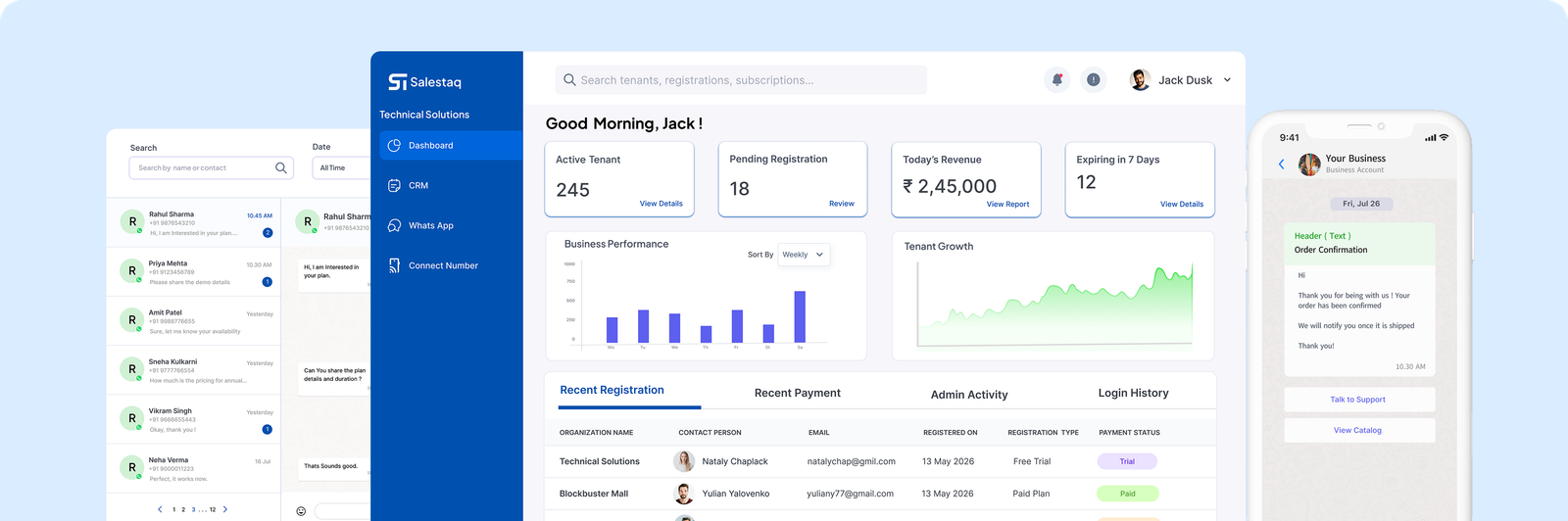
Salestaq is a CRM platform that brings customer management and WhatsApp communication together in one connected workspace. It helps businesses organize leads, manage customer conversations, track sales activities, and coordinate team workflows without switching between disconnected tools.
The design focuses on making customer information easier to access, conversations easier to manage, and business activities easier to track. Alongside the product interface, I designed the marketing website to communicate Salestaq’s capabilities and help potential customers understand the value of the platform.
My work covered the product experience across its core feature areas, from structuring workflows to designing the interface and presenting the platform through its marketing website. I focused on organizing complex functionality into clear, understandable experiences that support everyday business tasks.
Structured feature journeys and organized related functionality into understandable groups.
Designed screens for CRM management, WhatsApp communication, team collaboration, and business insights.
Presented the platform’s capabilities through feature categories, product previews, benefit-led messaging, and clear calls to action.
Salestaq brings together several business activities that are often handled separately. Customer records, sales pipelines, WhatsApp conversations, team assignments, and reporting all require different types of information and interactions.
The design challenge was to make these capabilities feel like one coherent product without overwhelming users with too many features or competing interface elements.
How might we bring customer records and WhatsApp conversations into one connected workflow?
How can teams understand customer context without repeatedly switching between screens?
How can we organize a broad set of features so users can find the right tools quickly?
How can we communicate a complex SaaS product clearly through its marketing website?
Turning product complexity into a clear, connected experience.
Bring customer data, sales activity and WhatsApp conversations together in a single view.
Help users quickly find and complete everyday tasks without unnecessary clicks.
Group related tools so the platform feels structured and easy to navigate.
Clearly communicate key features and benefits through the marketing website.
Present customer management, WhatsApp communication, team productivity, and analytics as connected parts of one platform.
Bring customer details, conversation history, notes, tags, and team assignments together around the communication workflow.
Group related tools into categories and provide dedicated feature explanations.
Break initial setup into six simple steps rather than presenting the entire setup process at once.
A closer look at key areas of the product and the design decisions that shaped the experience.

01Business Workspace
Bring core business activities together.
Salestaq combines CRM management, customer communication, team productivity, and business insights in one platform.
Establish a clear dashboard hierarchy so users can understand important business information and navigate to relevant workflows.
02Communication
Keep conversations connected to customer context.
The WhatsApp experience brings conversation history alongside customer information, team assignments, internal notes, tags, and activity history.
Support a more contextual communication workflow, with shared inbox functionality, broadcast messaging, message templates, and quick replies.

Manage all your customer data, leads, deals, and activities in one organized workspace.
Chat with customers on WhatsApp directly from your CRM and keep every conversation connected.

Work together as a team, assign tasks, share updates and close deals faster together.
Your data is protected with enterprise-grade security and accessible anytime, anywhere.
03Feature Architecture
Organize complexity into clear groups.
The website groups product capabilities into four categories: CRM Management, WhatsApp Communication, Team Productivity, and Business Insights.
Give each feature area a recognizable place, helping visitors understand the breadth of the product without encountering one long, unstructured list.
04Onboarding
Break setup into manageable steps.
The website communicates a six-step getting-started journey: create an account, create an organization, start a free trial, connect WhatsApp, import contacts, and start messaging customers.
Make the initial setup sequence visible and understandable before users commit to exploring the platform.
Sign up with your email and verify your account.
Set up your organization and invite your team members.
Activate your 7-day free trial with full feature access.
Link your WhatsApp Business account in just a few clicks.
Import existing customers and start working instantly.
Manage leads, conversations, tasks, and sales from one place.

05Smart Lead Capture
From business card to CRM contact.
The website highlights scanning a business card, extracting contact details, and creating a CRM contact.
Present a clear path from capturing contact information to storing it in the CRM, reducing reliance on manual typing.
Design Outcomes
A more connected product experience, with clearer workflows and a more understandable path from discovery to setup.
Related CRM, communication, collaboration, and analytics capabilities are presented as parts of one platform.
The designed experience brings relevant customer information and communication history together.
Grouped feature categories and dedicated website sections help explain what the platform offers.
The six-step onboarding presentation explains the sequence for getting started.